Serpstat – the most powerful tool for SEO, PPC, marketing, and content marketing
The world of SEO is full of communication and personal relationships. Many SEOs, or rather almost all, know each other...
Unancor
7 years ago

The world of SEO is full of communication and personal relationships. Many SEOs, or rather almost all, know each other at events, networking, having beers on the beach at SEonthebeach, or commenting on articles on each other's blogs.
Communication is the foundation for collaboration in SEO. And that’s how our partnership with Unancor and Serpstat came about!
We are excited to announce to all our users this agreement with the people at Serpstat, thus becoming the official data provider for Unancor 🎉
Thanks to this collaboration, from now on you will be able to see on our platform all the data that Serpstat provides us, not only for our media list but also for your own projects
What is Serpstat?
If you have your blog, an online business, or you are a company appearing in Google search results, this tool is a great help for analyzing any website and enhancing the effectiveness of your work.
Serpstat – is an all-in-one online platform, consisting of the following functionalities:
- Website analysis
- Keyword analysis
- Backlink analysis
- Position tracking 2.0
- Website audit
- Checklist
- Keyword grouping

It was created in 2013 in an SEO and PPC agency called Netpeak, and in 2015 it became independent. Since then, Serpstat has been growing rapidly, and every two weeks the tool's developers release updates and new functionalities.
How does it differ from other SEO tools?
If you have been in the world of SEO and digital marketing for a long time, you probably already know other all-in-one SEO tools, such as Semrush or Ahrefs.
You might even think that you don’t need to know another tool since they seem to offer the same functionalities.
But I want to surprise you, dear reader, and I invite you to get to know Serpstat to make room for it in your toolkit 🙂
Things that only Serpstat has:
- The databases of all countries that grow automatically every day (see the page with statistics);
- The US database is the largest compared to similar tools and has 2.5 billion keywords;
- Integration API with Google Sheets, starting from the “Lite” plan (for now Plan B);
- Functionality to perform an audit of a single page;
- Serpstat plugin for Google Chrome and Mozilla Firefox;
- Tool to create checklists for various tasks;
- Keyword grouping with hierarchical structure;
- Latest tool developed – Serpstat API Console;
- Updates every two weeks, which we discuss on our channel Serpstat in Spanish;
- And many proprietary metrics.
The most accessible tool on the market
Tools that cover different SEO tasks start at $99 per month. These brands have a good reputation to demand this price, and most people pay this money because they are well-known brands and occupy a significant part of the market.
But what about freelance SEO specialists, bloggers, and beginners who are starting to learn the SEO world, or those who do not need the limits offered by expensive plans? They will not pay this price.
Serpstat can solve this problem, with a plan starting at just $19/month. Here’s the page for Plans and Pricing.

Serpstat changes Plans and pricing from June 10, 2019
In just one year, we have covered search analytics with all Google databases from all countries, and we have significantly increased the databases we had. We have released a new version of Rank Tracker 2.0, a checklist tool, a single URL audit, and we are in the stage of enhancing the backlink analysis tool.
We continue to improve the tool daily, and we plan to do many more things, always focusing on the needs of our clients.
But like any business, to develop better, release new functionalities, and improve the database, we need to have resources.
We will not abandon clients who want to continue with the $19 plan; for this, we have launched the last chance campaign to buy the plan you want with the current limits.
That is, you can subscribe to any plan by selecting “recurring payment”.
Recurring payment – automatic charges.

In this way, you will always keep the plan you want, at the current price, and with the current limits. And the change in pricing will not affect your selected plan.
As long as you pay the recurring fee, the rate will work for you.
New Plans and Prices
Starting from June 10, 2019, we will no longer have the same pricing system. Here is a comparison table of Plans and limits:

We will not raise prices. What we are doing is removing the $19 plan and lowering the limits for tool usage.
With the new rates, we will continue to be the most accessible tool on the market compared to our competitors. The limits of the new rate will be higher and at a lower price than those of other similar tools.
Website analysis
You can perform an analysis of your own website and your competitor's website.
All you need to do is enter the domain name or specific URL into the Serpstat search bar.

Domain analysis
The first thing the tool shows when entering the domain is a summary report, in which you will find:
- Visibility metric (calculated based on the quantity and popularity of keywords for which the analyzed domain ranks in the top 20)
- Approximate traffic it has (calculated based on click-through rate; the number of monthly visits depends on the keywords for which the domain appears in the top 100 on Google, its position, and search volume)
- Keywords for which it ranks in organic search
- Keywords for which it appears in paid search (AdWords).

- Distribution of keywords by positions
- Subdomains

- Visibility graph over the last year or for the entire period;
- Traffic graph over the last year or for the entire period;

- Number of keywords over the last year or for the entire period;
- The most popular pages of the website

- Competitors in organic search, who are ranked for the same or similar keywords
- Graph of the closest competitors based on semantic structure and visibility level.

- Competitors in AdWords;
- Examples of ads;

By clicking on the name of each report, you can view it in more detail.
The domain analysis offers functionality to compare semantics between 2 or 3 domains. For this, you need to go to the “Domain vs Domain” report

URL analysis
By entering a specific URL with the https protocol into the search bar, Serpstat provides key data about the analyzed URL:
- Keywords for which the analyzed URL ranks in organic search
- Keywords for which the analyzed URL ranks in paid search (AdWords).

- Distribution of keywords of the analyzed URL by positions (how many keywords rank in TOP 1, between TOP 1 and TOP 3, etc.)
- Competitors in organic search (URLs of competitors ranking for the same keywords as the analyzed URL)

- Omitted keywords (which are those keywords for which competitor URLs appear in the Top 20 search results, but the analyzed URL does not appear in the TOP 100);
- Examples of ads (if the URL is ranking in AdWords ads);

The URL analysis also allows comparing the semantics of 2 or 3 URLs.

Keyword Research
Enter the keyword you want to analyze and hit search. Just like in other modules, the keyword analysis tool gives you an overview:
- Search volume of the analyzed keyword;
- Level of competition;
- Cost per click;
- Difficulty of ranking for this keyword in TOP 10 (first page of Google);

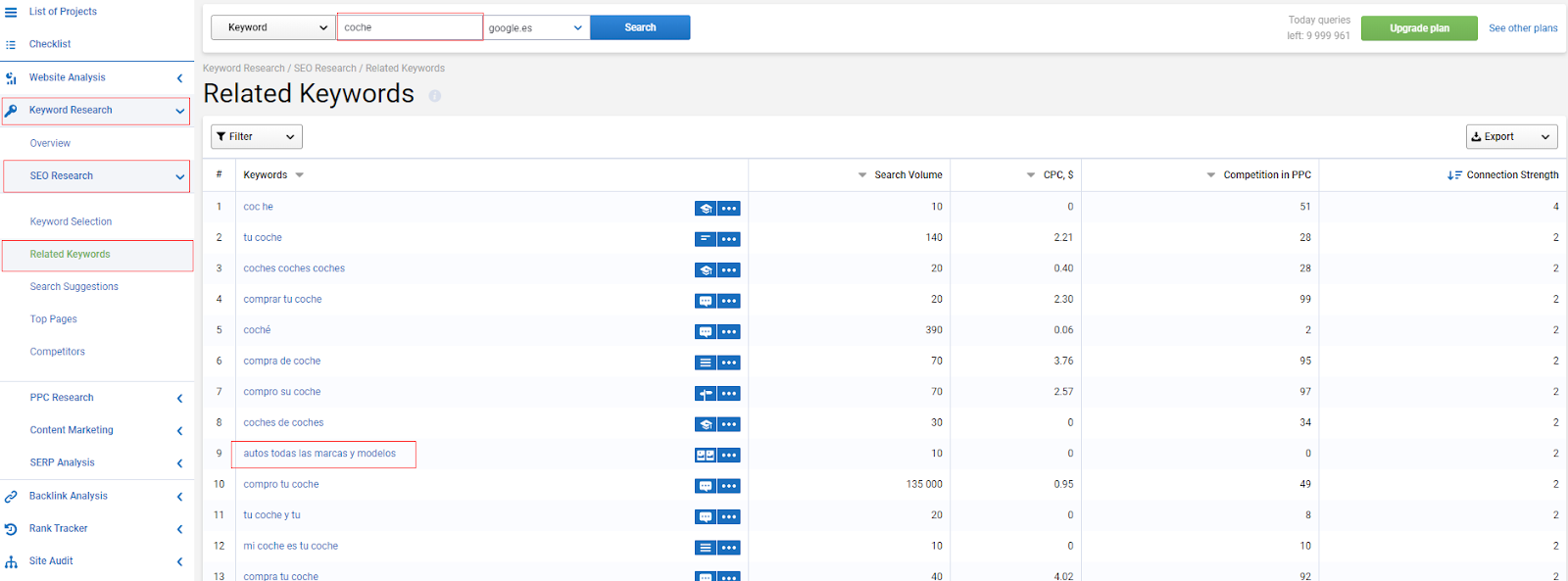
One of Serpstat's unique reports – “Related Keywords”
This report contains those keywords that are related to the analyzed keyword and share the same URLs in the search results.
The last column – “Connection Strength” indicates how many URLs the keywords in the list have in common in the top 20 search results with the analyzed keyword. The maximum number is 20.
Content Marketing Tool
This functionality offers content ideas. The reports are created based on the most popular search questions and suggestions that people enter in real-time.

Video Webinar on Domain, URL, and Keyword Analysis
Backlink Analysis
Reports and metrics provided by this module:
- Overview of backlinks;

- Proprietary metrics of Serpstat – SPR (Serpstat Page Rank), the authority of the page, based on the number of referring domains. And STR – Serpstat Trust Rank, which shows whether the analyzed page can be trusted, based on the trust level of all those pages that reference it.
- Report of Referring Domains;
- Report of referring pages, where you can see graphs and lists of new and lost links;

- External links or outbound links.
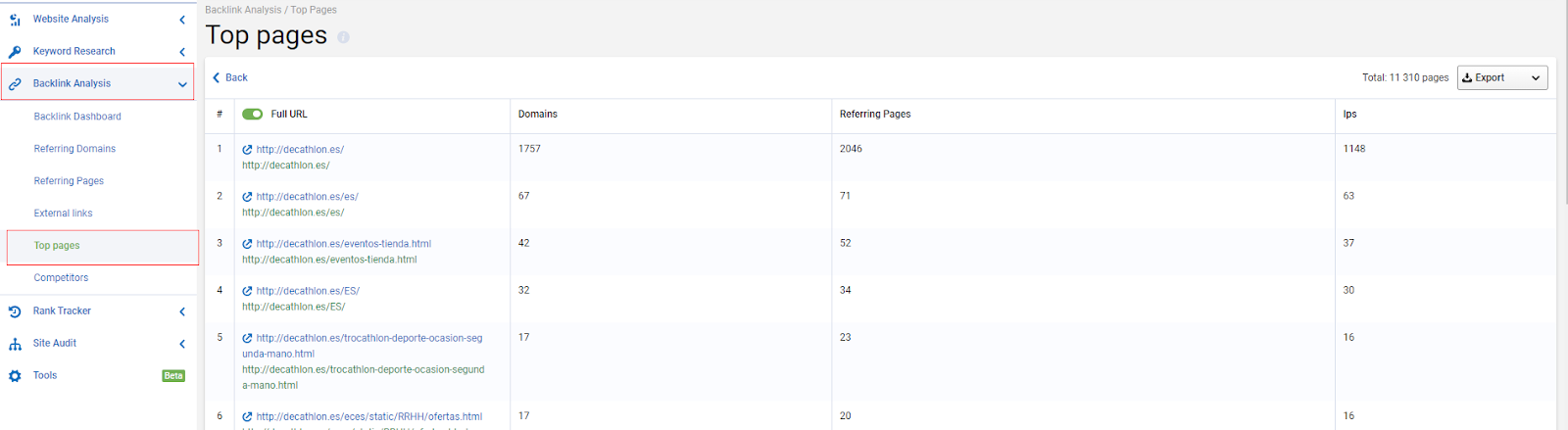
- Pages with the highest number of backlinks
- Competitor report, in which you can create lists with different competitors and perform a group analysis of backlinks

Position Tracking 2.0
This tool has completely changed its design and significantly improved its current version.
This is what the report of tracked positions in the project looks like:

There is also the option to view everything with the old design.
The Rank Tracker tool has many unique functionalities; in this video, I explain 5 of them.
Website Audit
Serpstat shows errors that affect the loading speed of the website and the ranking in search engines, and divides them into 4 groups according to the level of priority you have.
First, you need to fix high-severity errors. These are marked in red:

By clicking on any error, detailed information about the type of error and recommendations on how to fix it will appear.

After making changes to the website and fixing technical errors, you can perform another audit to see if the SDO – Serpstat Domain Optimization score has changed.
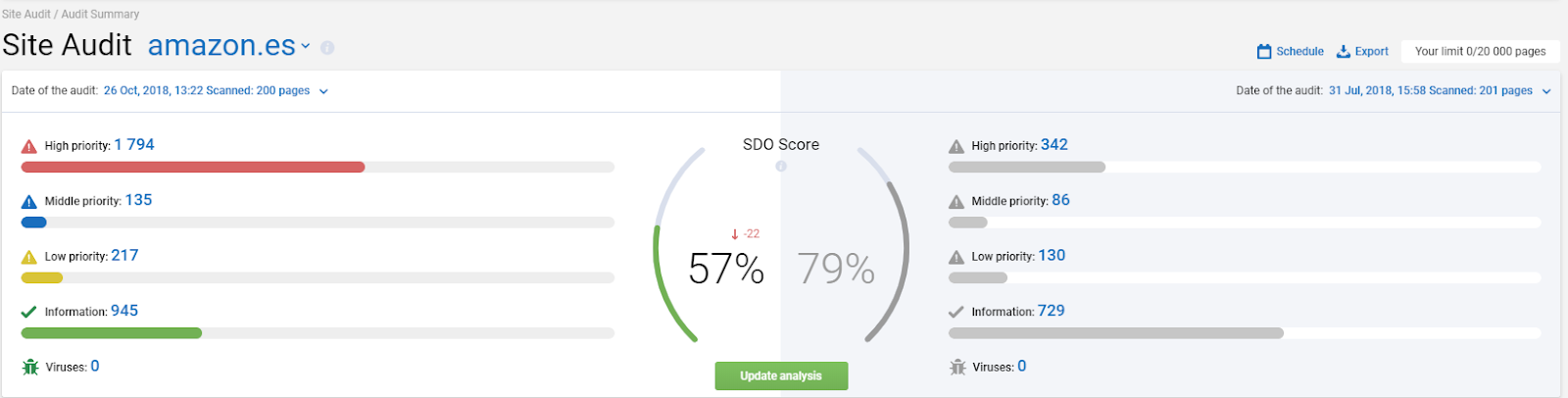
The errors affecting the loading speed of the website are divided between those that are important for mobile devices and those that are important for the desktop version.

Audit of a Single URL
The option to perform an audit of any URL, whether it’s a landing page for marketing campaigns, an article you just released, the homepage, or any page you consider to be of great importance (for example, one that attracts more traffic) and want to optimize better.
The good thing about this tool is that you don’t have to analyze the entire website and wait hours while the audit information is processed.
You simply add the URL and wait a couple of seconds while Serpstat analyzes the data.

Checklist for your project tasks
If you like working with checklists, or if you have a team to manage, this functionality will be very useful for you.
It involves creating lists for different SEO and marketing tasks.
The lists can be modified according to your needs, and you can also create custom lists.

Keyword Grouping
This functionality consists of grouping phrases, dividing them into clusters, super clusters, and proto clusters.

To set up the grouping project, the user is asked to select the link strength and the type of grouping.
Link strength – shows how many URLs in common a pair of keywords must have in the same group. And the type of grouping, hard or soft, shows how the groups will be combined.
Hard grouping requires that all keywords in the same cluster must have at least “P” common URLs. With soft grouping, you may not have common URLs with some keywords.
Here’s the video about the algorithm of the tool (Translated into English).
Need help with your Link Building strategy?
Our team of experts is ready to help you boost your project with personalized strategies
Contact us nowConclusions
I hope you enjoyed getting to know Serpstat. And if I have piqued your curiosity about the tool and you want to learn more about it, I leave you the link to request your free personal demo.
Seek new opportunities, rank your page well, and let your online traffic grow 😉


